What is biometric software in physical security? Learn how it manages enrollment, biometric data, and readers across sites, plus questions to ask vendors.
What you’ll learn: What biometric software means in a physical security context, the terminology that’s more precise, and what you actually need to manage enrollment, biometric templates, and readers across your multi-site enterprise. Walk away with a list of questions you can use when evaluating different vendors.
Who should read this? IT and Security Engineers, along with Facilities and Physical Security Directors, looking for clarity on how biometrics can best fit their environment and support their physical access control needs.
When you’re investigating biometrics as a solution to secure access to physical spaces, specificity matters. With so many different vendors labelling their solutions as “biometric software,” you can quickly find yourself sifting through options that don’t apply. For example, biometric software that verifies someone’s identity before they can log into a computer or phone.
This article cuts through the noise, focusing specifically on biometric software for securing physical access. Keep reading to define critical terms, tease out solution differences, and answer your top questions about biometric authentication, enrollment, data protection, and managing everything at scale.
What is Biometric Software?
Biometric software uses a person’s distinctive physical or behavioral traits to verify their identity. It can support a variety of functions, including unlocking an app and controlling entry to a secure building. In the realm of physical security, this software is critical for biometric access control.
From Broad Application to Zooming in on Physical Security
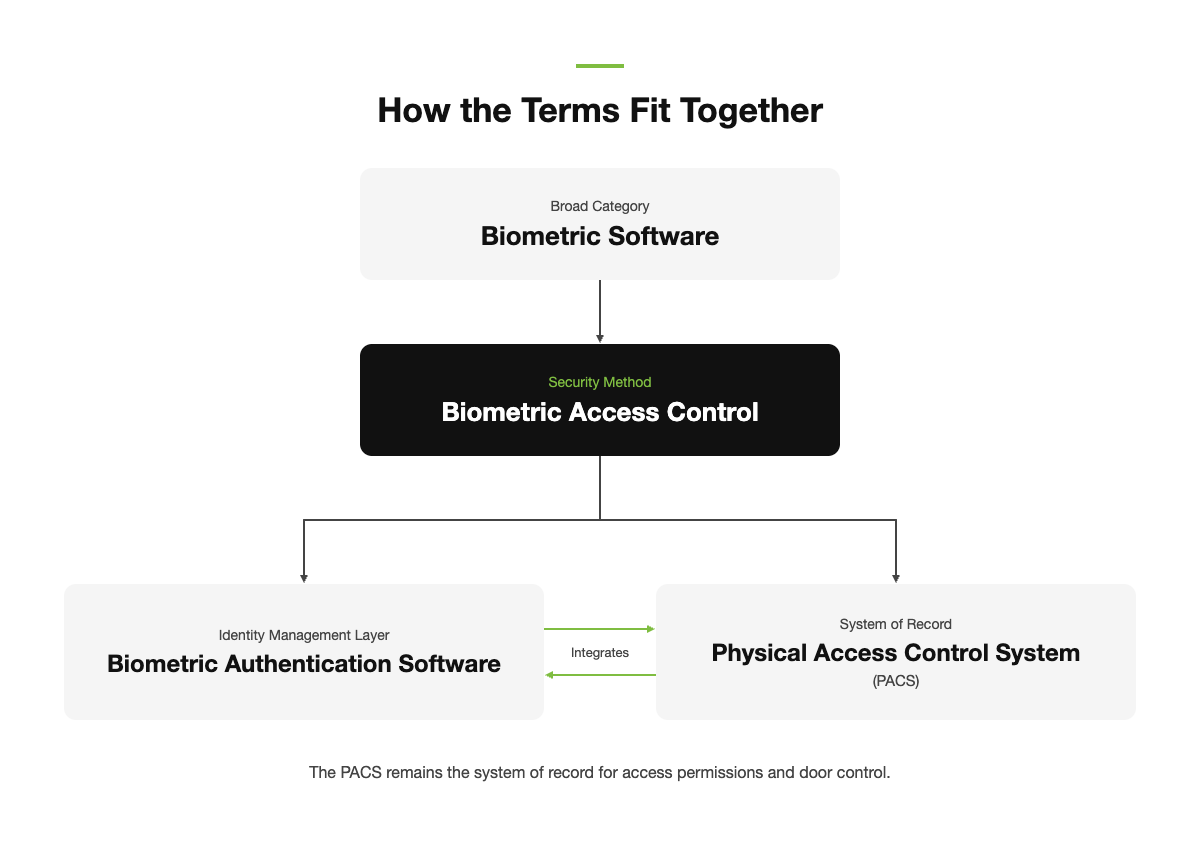
Let’s take a quick moment to unpack how the different terms stack together.
- Biometric software is the overarching category that encompasses many different types of applications.
- Biometric access control is a security method. It uses a particular type of biometric software to verify identity for the distinct purpose of granting them access to a physical space, like an office building, data center, or server closet.
- Biometric authentication software is a term more commonly used in the world of physical access control. It captures, stores, and matches biometric templates to verify an enrolled user’s identity before they can walk through a protected door. It also manages enrollment, templates, and readers across every door and site. This type of software is often described as providing a biometric identity management layer.
- Note that biometric authentication software doesn’t replace your existing physical access control system (PACS). The PACS remains your system of record for managing access permissions and controlling doors, schedules, and credentials.
Now that we’re clear on how the terms fit together, let’s explore the hardware side of the equation.
What’s the Difference Between Biometric Software and Biometric Readers?
Biometrics readers are the hardware components that work with biometric authentication software. A reader’s job is to capture a biometric modality, like a face or fingerprint, and compare it to a securely stored template. If there’s a successful match, the software sends the authentication result to the PACS and the door opens.
Is There a “Best” Biometric Modality to Use for Physical Access?
Choosing whether to have people scan their faces or fingerprints at a biometric reader depends on your specific needs. Most organizations choose to use different types of readers to support the security and convenience realities across different areas of the business. For example:
- Face readers are touchless, convenient, and support busy areas where a lot of people need to get through quickly.
- Fingerprint readers require a more deliberate step. They are perfect for areas requiring strong identity assurance or where users can’t face readers as easily.
- Some readers also offer multi-modal authentication for added security. For example, every biometric reader in the Arc Suite offers the option of a biometric (face or fingerprint) plus key card and/or PIN authentication in one device. The exact combination depends on the model chosen.
Regardless of the modalities supported, biometric readers that aren’t part of centrally managed biometric authentication solutions will cause re-enrollment and administrative headaches as deployments grow.
How Do You Know Biometric Authentication Software Will Work at Scale?
Biometric authentication software works at scale when one centralized platform can manage users, templates, and readers across multiple sites. A MAS/SAS architecture (Master Application Server/Satellite Application Server), like the one underpinning BioConnect Enterprise, supports centralized management.
- Enroll users once. MAS/SAS automatically synchronizes enrolled user’s templates across sites. As new sites and readers come online, users automatically have access. (Note: you can eliminate manual enrollment altogether for facial authentication, with BioConnect’s No Enrollment feature that syncs existing profile images directly from the PACS or HR system.)
Dig into the details of MAS/SAS.
-
Manage different reader models through one platform. Configure supported readers and manage their lifecycle in the same software you use to manage biometric identities and templates. Adding another supported model doesn’t require a separate reader-specific application and administrative workflow.
- Support growth without a large server footprint. BioConnect Enterprise 5.6 supports up to 1,000 devices per server, which means a 3,000-reader deployment can be managed across three servers through a single platform.
Managing a Biometric Deployment Reader-by-Reader vs Through a Centralized Platform
| Admin Priorities | Reader-By-Reader Management | Centralized Management |
| Enrollment | Users enroll separately, by reader or site | Users enroll once and templates or images sync to all the right readers |
| Adding a new reader model | Requires installing new software and, often, user re-enrollment | Readers are added to the same platform and existing templates carry over |
| Adding a new site | Setup and enrollment repeated from scratch | Site added to the existing deployment |
| Offboarding a user | Removed site by site, with gaps possible | Removed once, synchronized everywhere |
| Records | Logs siloed by vendor and site | One view across readers and sites |
| Access control integration | Each tool integrated separately, if at all | One integration with the existing PACS |
Top Questions to Ask a Biometric Software Vendor About Physical Access Security
1. Which physical access control systems (PACS) do you integrate with, and how deep are those integrations
Why it matters: Integration depth affects how biometric authentication solutions fit existing workflows and whether administrators need to use separate tools. For example, some vendors also offer deep embed, which allows security administrators to manage enrollments and templates within their existing PACS application.
2. Can my users enroll once and use biometric readers across all their authorized sites?
Why it matters: If enrollment and template management happen separately at each site or reader, users are forced to enroll more than once and administrators must repeat the work.
3. How many readers or devices can each server support, and how does the architecture scale across sites?
Why it matters: This helps IT teams understand the server capacity and infrastructure a deployment may require as it grows.
4. Which biometric reader models can the platform manage, and can they work alongside our existing card readers?
Why it matters: Reader compatibility affects whether you can support different hardware through one platform or have to manage separate systems. Multi-modal readers allow you to support multiple credentials in one device, streamlining hardware, wiring, and maintenance at every door.
5. Does the software run on-premises, in the cloud, or in a hybrid environment? Where is biometric data stored and who can access it?
Why it matters: Your organization’s infrastructure, data-residency rules, and governance requirements may affect which deployment model is appropriate.
6. How does the platform protect biometric data from unauthorized access or disclosure?
Why it matters: You’ll want to know how the vendor handles encryption in transit and at rest, administrator access controls, audit logs, and security incidents. This helps you assess the safeguards around biometric data, beyond where it’s hosted.
7. How does the system capture and track consent for biometric enrollment?
Why it matters: Consent requirements vary by jurisdiction. The system should record explicit opt-in before enrollment and keep an auditable history of consent and any revocation, so it’s easy to document and review how consent was handled.
8. When someone leaves, how are their biometric templates removed across sites and readers?
Why it matters: Revoking someone’s access in the PACS and removing their biometric data are related (but distinct) steps. Ask whether offboarding changes are automatically propagated across the connected deployment.
Ask the Right Questions to Get a Solution That Scales
Choosing biometric software for physical security across multi-site enterprise deployments means understanding what separates a solution that scales from one that doesn’t. After reading this article, you’re now well-equipped to ask potential vendors the right questions about enrollment, authentication, security, and centralized management.
Need more questions answered?
Take 30 seconds to find the right biometric readers and integration setup.
Book your personalized demo with one of our experts.
FAQs
What is biometric software in physical security?
Biometric software used for physical security manages enrollment, biometric data, and readers to support verification of enrolled users at controlled doors. It’s more commonly referred to as “biometric authentication software” when used for physical access control.
Is biometric facial authentication the same as facial recognition?
Facial authentication requires the user to be an active participant who gives consent for their physical features to be collected and used to create a biometric template that systems use to verify their identity. Facial recognition is often performed without explicit consent. It matches identity based on templates created from covertly collected physical data. Read about the differences.
Are biometric software and biometric readers the same thing?
No. The reader captures a new image of a face or fingerprint at the door and matches it to a stored template. The software manages enrollment, templates, devices, and policies across all readers.
Does biometric authentication software run in the cloud or on-premises?
It depends on the solution. BioConnect Enterprise runs on-premises.