Blog
What is Biometric Enrollment? A Guide for Security and IT Teams.
How biometric enrollment works, why it slows deployments, and how to remove the friction with BioConnect.
Explore biometric enrollment, matching, OSDP vs. Wiegand, and why central management matters for multi-site deployments.
What you’ll learn: Dig into the components of a biometric access control system and how enrollment and matching work. Discover how biometric readers connect to the PACS and why a centrally managed architecture is best.
Who should read this? IT/Security Engineers who already manage key cards are exploring adding biometrics for access control. This article is for those who want to look beyond the hardware to better understand the underlying architecture.
Introducing biometric credentials for accessing your organization’s protected spaces can feel disruptive. Change management aside, there are important questions to answer before you can confidently move forward with choosing a biometric access control system. For example:
This article looks beyond the hardware to explain how biometric access control works and why the underlying architecture matters.
A biometric access control system uses a person’s unique physical characteristics to determine whether to grant them access to a protected area. Facial features and fingerprints are two common physiological traits used to enroll users in a biometric system.
Read a complete guide to biometric access control.
A typical biometric deployment adds a layer of identity verification to an organization’s existing PACS. Here’s a high-level look at how the various components fit together.
Biometric enrollment captures a person’s unique physical characteristics and links them to their identity record. In a centrally managed system, the person enrolls once, and the management software distributes their biometric data to readers at the locations where they’re authorized to access.
It’s important to note that not all biometric access control systems are centrally managed. Some require re-enrollment at each reader or site, creating a heavier administrative load for teams to manage.
Here’s how the steps flow in a centrally managed system.
The Flow From Enrollment to Entry
| Enrollment and matching flow | What's happening behind the scenes |
| A user enrolls in the biometric system. |
Traditionally enrollment is done in person through a biometric capture. For example, a user enrolling in facial authentication faces a camera and follows prompts to position their face in various ways. The system captures the user’s distinguishing features. For facial authentication, there is another option that eliminates the need for every user to be present for manual in-person enrollment. BioConnect has a No Enrollment feature that syncs existing profile images from your PACS or HR system. With either method, and with Consent Tracking enabled, users must provide explicit opt-in consent before enrollment to comply with privacy laws. |
| The biometric access control system stores the enrollment data: a template for fingerprint, or an enrolled image for face. |
For fingerprint, the system doesn’t store an image of the user’s fingerprint. The captured characteristics are converted into a mathematical representation, a biometric template. For face, the system stores the enrolled image, and each reader converts it into a template for matching. This biometric data (a template for fingerprint, an enrolled image for face) gets linked to the user’s identity record and access rights. Biometric readers use this data to authenticate each user’s presented face or fingerprint. |
| The user’s biometric data is automatically distributed to the right readers. | The biometric identity management layer distributes each user’s biometric data to the readers where they’re authorized to enter. What gets sent depends on the modality: fingerprint deployments send the enrolled template directly to the reader, while face deployments send the enrolled image, and each face reader creates its own template from that image. In both cases, the system centrally handles synchronization, configuration, and lifecycle management. |
| A user presents their face or fingerprint to a reader for matching. |
A user who wishes to gain access to a space presents their face or fingerprint to a biometric reader. It takes a new capture and attempts to compare it with the relevant template. The matching ratio used depends on whether or not the system already knows who the user claims to be.
|
| The authentication result is sent to the PACS. | After a successful match, the biometric identity management layer sends the authentication result to the PACS. |
| The PACS applies its access rules and grants or denies entry. | The PACS remains the system of record for access permissions. If the user is authorized, the door controller unlocks the door. |
Biometric readers communicate with access control panels through one of two protocols: Wiegand and OSDP. Once a reader captures a presented face or fingerprint and matches it to an enrolled template, it sends the authentication result over Wiegand or OSDP.
Strengths: Simplicity and ease of implementation.
Watchouts: Wiegand transmits data without encryption or built-in safeguards against interception, tampering, or replay. One-way communication also means the panel can’t send information or updates to the reader.
Strengths: OSDP supports two-way, supervised communication between readers and panels, interoperability across manufacturers, and remote management on compatible devices. Secure Channel offers AES-128 encryption.
Watchouts: Teams must enable and configure Secure Channel for encryption to be active.
BioConnect’s Arc Suite of readers provides a practical example of Wiegand and OSDP in action. Each of the biometric devices offers multi-modal authentication and connects to access control panels through either Wiegand or OSDP.
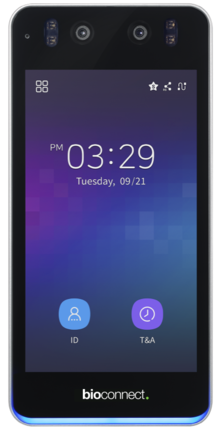
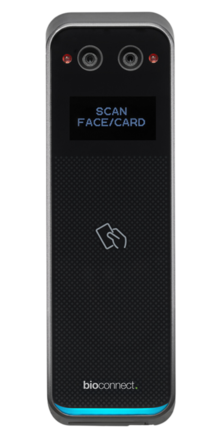
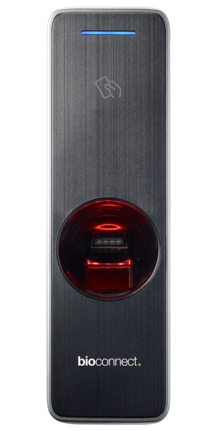
| Biometric device | Arc Vision | Arc Rex | Arc Touch |
| Authentication type | Multi-modal: Face + Card + Pin |
Multi-modal: Face + Card |
Multi-modal: Fingerprint + Card |
| Communication protocol | Wiegand or OSDP | Wiegand or OSDP | Wiegand or OSDP |
Arc Suite readers are managed centrally through BioConnect Enterprise. Users enroll once, and their biometric data is automatically distributed to authorized readers across sites, eliminating the need to re-enroll at each location as deployments grow. The architecture powering this centralized management is BioConnect’s MAS/SAS model.
As your biometric access control deployment grows, so does the complexity of securely managing the identities within it. A Master Application Server/Satellite Application Server (MAS/SAS) architecture simplifies management in large or distributed environments.
This hub-and-spoke architecture is what BioConnect Enterprise uses to keep user information, credentials, and biometric templates up to date across all locations—no matter how many readers are included in the deployment. This approach simplifies management while protecting uptime, data integrity, and user experience.
BioConnect Enterprise also streamlines both infrastructure management and cost. Version 5.6 supports up to 1,000 devices per server. This means a multi-site deployment with 3,000-readers can run on three servers rather than ten.
A biometric access control system's architecture determines whether it scales cleanly to keep up with enterprise growth. When enrollment and reader management happen separately at each location, users must enroll more than once and administrators are forced to manage each site independently.
BioConnect Enterprise solves these challenges. It uses centralized management and a MAS/SAS architecture to keep biometric identities and templates synchronized across sites. Users can enroll once and authenticate at any readers where they’re authorized, while the PACS continues to make access decisions. As your organization grows, this approach lets you expand biometric access without multiplying the work of managing it.
Explore how BioConnect Enterprise can support your multi-site biometric access deployment. Book a demo.
FAQs
Q: How many biometric devices can one server support?
A: It differs by solution. With the release of BioConnect Enterprise 5.6, teams can now run 1,000 biometric devices per server from a single enrollment.
Q: Where is biometric data stored, and how is it protected?
A: BioConnect stores biometric information within the customer’s environment rather than in its cloud. For fingerprint, captures are converted into encrypted templates rather than stored as images. For face, the enrolled image is stored and distributed to readers, which convert it into templates for matching. The system encrypts all communication between system components and protects data in transit and at rest.
Q: Do my existing key card readers need to be replaced in a biometric deployment?
A: With multi-modal biometric devices, you can enable multi-factor authentication with one device. This eliminates the need to install multiple readers at each access point.
How biometric enrollment works, why it slows deployments, and how to remove the friction with BioConnect.
Biometric identity management explained: what it is, how it fits within biometric access control, and why centralized enrollment matters.
Boost your security infrastructure with BioConnect AI’s managed services, delivering advanced biometric solutions and seamless access control...