Blog
What Buyers Get Wrong About Facial Recognition Access Control
Facial recognition and facial authentication aren't the same. Here's what buyers get wrong and what to look for instead.
Key cards and PINs authenticate a credential. Biometric access control authenticates a person. Here's how it works and how to evaluate it.
What you’ll learn: What biometric access control is, how popular biometric readers work, how biometrics integrate with existing access control systems, the role of a biometric management layer, and the factors driving enterprise adoption.
Who should read this? Security directors, IT managers, operations leaders, and facilities managers evaluating biometric access control for enterprise environments.
Imagine the year is 2005. It’s 10 pm and someone rings your doorbell. Through the locked door, you ask who’s there and the person identifies themselves as Jack, your neighbor of five years. Since you know and trust Jack, you decide to open the door.
These days, you wouldn’t have to take Jack's word for it. With video doorbells you can see exactly who's at your door before you decide it’s safe to open. By layering in additional technology, doorbell vendors have made it easier to answer a critical question: who’s really asking to get in?
Enterprises face the same question every day.
For decades, they’ve relied on key cards, PIN codes, and fobs to secure access to sensitive areas. These systems are designed to confirm a credential was presented, and they do it well. But they can't confirm who is actually presenting the credential.
Biometric access control solves this problem. It adds a layer of secure identity verification by using fingerprints, facial recognition, or other unique characteristics to authenticate the person behind the credential. It’s a proven way to make access control more secure, frictionless, and scalable.
Biometric access control is a security method that uses unique physical characteristics, such as fingerprints or facial features, to verify a person's identity before granting access to a physical space
As enterprise leaders face increased pressure to secure their organization’s sensitive assets, it can feel overwhelming to cut through competing vendor claims and technical jargon. Whether you're just getting started with biometric access control, trying to understand how identity management with biometrics works, or investigating specific biometric readers, this guide offers the straightforward answers you seek.
For many organizations, a near-miss, failed audit, or new compliance requirement becomes the catalyst for reevaluating physical access controls. While these are important, there are other reasons to add identity management with biometrics:
Some organizations aren’t adopting biometrics for the first time. Instead, they’re modernizing aging biometric infrastructure to improve scalability, security and manageability. And they’re very interested in preserving existing access control system investments.
Authentication methods in physical access control typically fall into three categories: something you know, something you have, and something you are.
|
1 Something you know |
2 Something you have |
3 Something you are |
|
This is information that’s memorized, like PIN codes and passwords. |
This is something physical or digital you carry, such as a key card, fob, or mobile device. | This is a unique biological characteristic, such as fingerprints, facial features, iris patterns, voice characteristics, or even palm vein patterns. |
| Verifies a credential | Verifies a credential | Verifies an identity |
In most enterprise environments, biometric authentication software isn't replacing credential verification. Instead, it’s adding identity verification to the mix. Two of the most popular technologies used are biometric fingerprint readers and facial authentication systems.
Biometric readers compare physiological traits, like fingerprints and facial features, to data stored in an access control system.
Modern biometric readers offer multi-modal authentication in a single piece of hardware. For example, BioConnect includes card and PIN authentication options within its Arc Touch fingerprint and Arc Vision facial authentication technologies.
While fingerprint enrollment requires each user to present in-person for a scan, advances in face enrollment have made the process much easier.
.png?width=1200&height=400&name=Genetec%20Deep%20Embed%20(1).png)
Enroll users for facial authentication using an existing Genetec cardholder photo or any image from your computer.
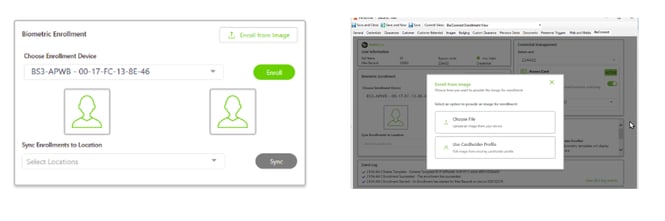
Pull existing cardholder images directly from Software House CCURE 9000 for instant facial authentication enrollment.
Enroll once, provide access everywhere. Within minutes of successful enrollment, users can access every physical space they have been granted permission to enter.
To put it in context, imagine an organization with 30 offices across Canada and the U.S. It requires both a fingerprint and key card to enter any building. If an employee based in Toronto travels to the Boston office, they can use the same credentials to gain access without re-enrolling or involving local staff.
Choosing biometric access control doesn’t require replacement of an existing system that’s already working. Instead, organizations can add biometric authentication into mainstream access control platforms.
In many enterprise environments, this is accomplished through a biometric management layer that integrates with the existing access control system. Native integrations reduce deployment risk and eliminate the need for manual data synchronization.
Here’s a simplified way to think about it:
The two systems handle distinct jobs.
| Access Control System | Biometric Identity Management Layer |
|
Manages access permissions |
Manages biometric identities |
|
Determines who is authorized |
Authenticates who the person is |
|
Controls doors, schedules, and credentials |
Manages enrollment and biometric templates |
|
Acts as the system of record |
Integrates with the existing access control system |
|
Examples: Genetec, Software House, LenelS2 |
Example: BioConnect |
There are some access control systems that claim to incorporate biometrics without a management layer. While this may seem handy in theory, in practice issues arise as deployments grow across buildings, sites, and user groups.
Without a dedicated biometric management layer, organizations may find themselves managing biometric data in multiple places, limiting future flexibility, and increasing admin complexity.
A dedicated management layer makes biometric access control scalable, secure, and easier to manage across the enterprise.
The challenge: As organizations grow, biometric deployments need to support additional buildings, users, and readers without requiring a complete redesign.
The fix: A biometric management layer provides a foundation that can expand alongside the organization while offering centralized management and a consistent user experience. Users enroll once and enjoy access everywhere they are authorized to be.
The challenge: Biometric data introduces unique privacy, security and regulatory considerations. Organizations need confidence that biometric information is collected, stored and managed responsibly.
The fix: A biometric management layer helps organizations implement reliable authentication while maintaining strong privacy controls. For example, BioConnect incorporates privacy and compliance features directly into its platform to help organizations protect biometric data and support regulatory requirements. These capabilities include:
The challenge: Managing enrollments, readers, and user information across multiple systems and locations can quickly overwhelm internal teams.
The fix: A centralized management layer simplifies enrollment, synchronization, and reader administration while reducing manual processes. IT, facilities, or security teams don’t need to get involved every time a credentialed employee or contractor needs access to a new space.
Traditional access control systems aren't going away. Key cards, PINs, and mobile credentials will continue to play an important role in physical security. But knowing that a credential was presented is no longer enough for many enterprises.
Many teams now recognize the value of adding identity verification to their access control systems. But they’re still investigating how to strengthen security without introducing additional complexity. They’re also evaluating which biometric technologies are best suited to their environment.
There’s a lot riding on choosing the right solution. Our Solution Builder can help simplify the process. Answer three quick questions to receive a recommendation tailored to your needs.
Still have questions about biometric access control? Get them answered below.
FAQs
Q: What’s an example of biometric access control?
A: Here’s an example of biometric access control in action. A data center employee who needs access to a server room first taps a key card to a reader and then verifies their identity with a fingerprint. The key card confirms the credential is authorized to access the space, while the fingerprint confirms the person presenting the credential is the authorized user.
Q: How accurate are biometric readers?
A: Modern biometric readers are highly accurate when properly enrolled and configured. Performance can vary based on environmental conditions and the specific technology being used. Many enterprise readers also include liveness detection capabilities to help reduce false matches and prevent spoofing attempts.
Q: Can biometric readers replace key cards?
A: Biometric readers can be deployed as a standalone authentication method. However, in many enterprise environments, biometric readers are used alongside existing credentials rather than replacing them.
Q: How are fingerprints and face scans stored?
A: Biometric scans are typically stored as encrypted templates rather than images. Organizations considering the technology should understand where a vendor stores and processes biometric templates to make sure the approach aligns with its own security and compliance requirements.
Q: How is biometric data protected?
A: Modern biometric access control systems protect user information through encryption, consent controls, and audit capabilities.
Q: Can biometrics be used with existing access control systems?
A: Yes. Biometric technologies can be added to existing access control systems without replacing them. Some platforms offer native biometric capabilities, while others rely on a dedicated biometric identity management layer. Without a dedicated management layer, problems often emerge as organizations scale. Identity data becomes harder to manage across multiple locations, leading to increased administrative overhead and more complex compliance processes.
BioConnect adds a biometric identity layer to your existing access control system — no rip and replace, no re-enrollment required. See how it works for your organization. Book a demo today.
Facial recognition and facial authentication aren't the same. Here's what buyers get wrong and what to look for instead.
Learn how facial authentication strengthens enterprise access control by verifying identity alongside your existing PACS, not replacing it.
In an era where technology is advancing at breakneck speed, facial authentication has emerged as a cutting-edge solution in the domain of personal...