What you’ll learn: Facial authentication isn’t a replacement for key card and PIN authentication. Instead, it strengthens identity assurance within your existing enterprise access control system. See how the right solution protects biometric data, lightens enrollment load, and eases management at scale.
Who should read this? Security directors, IT managers, and facilities managers at enterprise organizations who are evaluating facial authentication and want to understand how it works, whether it’s right for their environment, and what to look for in a solution.
You’ve probably heard the idiom, “If it ain’t broke, don’t fix it.” It essentially means don’t change something that’s already working well. This may be good advice for life, but when it comes to enterprise access control, a more fitting philosophy is, “If it ain’t broke, you can still make it stronger.”
Traditional access control credentials, like key cards and PINs, are good at detecting whether a presented credential is authorized. But enterprises protecting sensitive data, critical infrastructure, and other high-value assets increasingly need to answer a more critical question: Is the person presenting that credential actually the person it was issued to?
Facial authentication adds that layer of identity assurance. Whether you’re implementing facial biometric authentication for the first time, or upgrading from a biometric system that no longer meets your needs, you’ll want to get clear on a few key things:
- How it differs from facial recognition
- How it works with your existing access control environment
- How it protects sensitive biometric data
- The enrollment realities
- The logistics of managing it at scale
Facial Authentication Isn’t the Same as Facial Recognition
Facial authentication is a form of biometric access control that uses a person’s unique facial characteristics to verify their identity before granting access to a physical space. It confirms they are who they claim to be by comparing the face a person actively presents against a stored biometric template created from their face when they enrolled in the system.
This is different from facial recognition technology, which passively identifies an unknown person by searching for a match among a database of many identities.
“Facial recognition access control” is sometimes used as a catch-all term for using facial biometrics to control physical access. But enterprises looking to verify the identity of opted-in, known users are really looking for facial authentication.
How Facial Authentication Fits in With Your Existing PACS
Imagine an employee approaching a restricted IT room. They scan a key card at the door. The physical access control system (PACS) confirms that the credential is authorized for that space. But before the door will open, a facial biometric reader verifies that the person who presented the card is the person it was issued to.
It sounds straightforward because it is. But behind that simple interaction, each part of the access control environment has a distinct job to do.
1. The reader authenticates the person.
Facial biometric readers are built on advanced AI authentication technology. They offer excellent accuracy at high speeds. For example, Arc Vision has a 0.2-second matching speed and non-stop pass-through. A high-performance solution like this offers distinctive features:
- Accurate face recognition in high-traffic areas, without compromising on speed.
- Increased matching performance when the person being authenticated is wearing a mask, glasses, hat, or a different hairstyle.
- Live face detection (anti-spoofing) to help prevent attempts to authenticate using a photo or other false representation.
- The ability for users to present multiple credentials, like facial, mobile, key cards and PINS, to a single device.
- Options for indoor and outdoor use. If you’re counting on facial authentication for identity verification at exterior access points, a solution like Arc Rex is rated to stand up to vandalism, dust, and all sorts of weather.
Wondering which facial biometric reader is right for you? Try our Solution Builder.
2. The biometric layer verifies their identity while the existing PACS stays in charge.
A biometric identity management layer sits between your access control system and installed facial readers. It verifies the person requesting access is the authorized credential holder.
This layer works alongside your PACS and the credentials you already rely on. Your main existing system remains the system of record, controlling permissions and access levels. Once identity is verified and the PACS confirms the person is authorized to enter, the door opens.
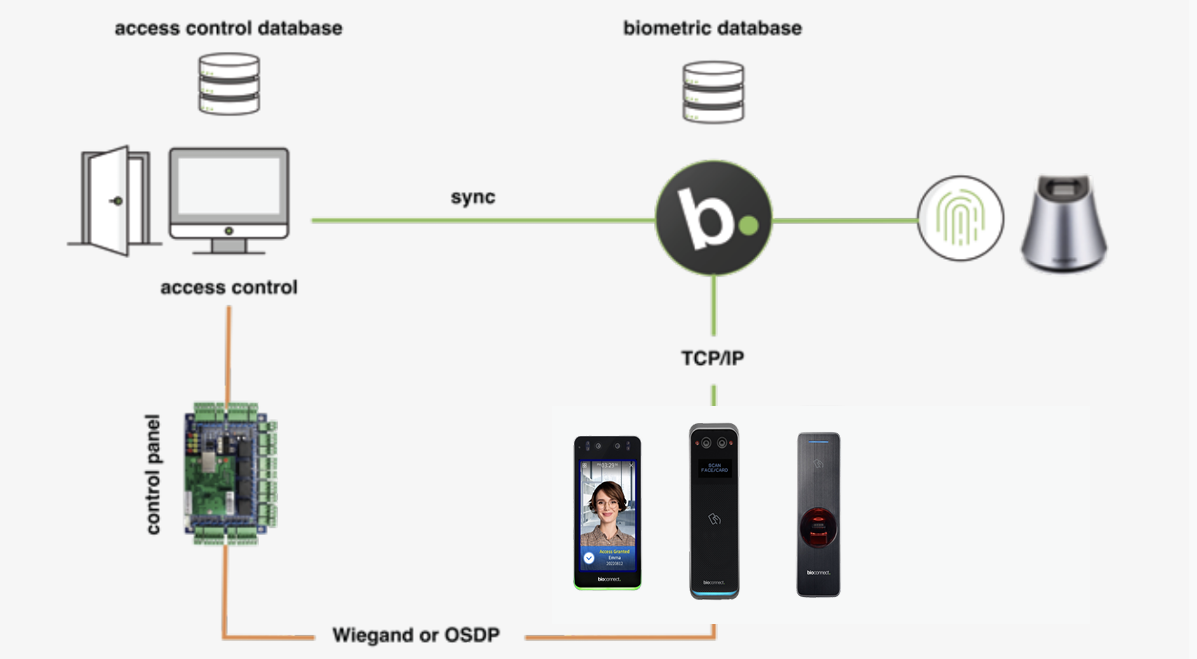
3. Facial authentication is flexible.
You can selectively install facial biometric readers to strengthen identity verification at priority access points first. Then add more as your security needs change.
You Can Trust Facial Biometric Authentication With Sensitive Data
Adding facial authentication shouldn't create concerns about introducing new privacy or compliance risks. An enterprise-ready solution protects sensitive biometric data while giving your team the controls needed to manage it responsibly.
- Start with the biometric data. During enrollment, facial authentication technology analyzes a user’s unique facial characteristics and converts them into a digital template used to verify identity. Encryption and image-free biometric authentication protect this data. You can make things even more secure by ensuring biometric templates are stored locally on a server hosted by your organization, rather than in the cloud.
- Consent matters too. Strong consent management allows you to capture and track user consent for the enrollment and use of their data. When users explicitly opt in, you get a record of their permission to collect and use their biometric information.
- Make sure you can prove it. If you’re audited, you need reliable records of how you’re managing biometric data and access. You’ll want to be able to track consent history, enrollment timestamps, revocation actions, authentication attempts, and access events.
Enrolling Users Doesn’t Have to be a Slog
The prospect of enrolling hundreds or thousands of users can instantly ignite existential operational dread. Traditionally, each person would need to scan their face before they could use facial authentication to access spaces. Multiply that process across a large workforce or multiple locations, and your enrollment team’s time is quickly monopolized.
BioConnect removes the need for manual face enrollment with its No Enrollment feature. Instead of asking every employee to complete a separate enrollment process, it uses approved profile images already stored in your existing access control or HR system to generate the secure biometric templates needed for facial authentication.
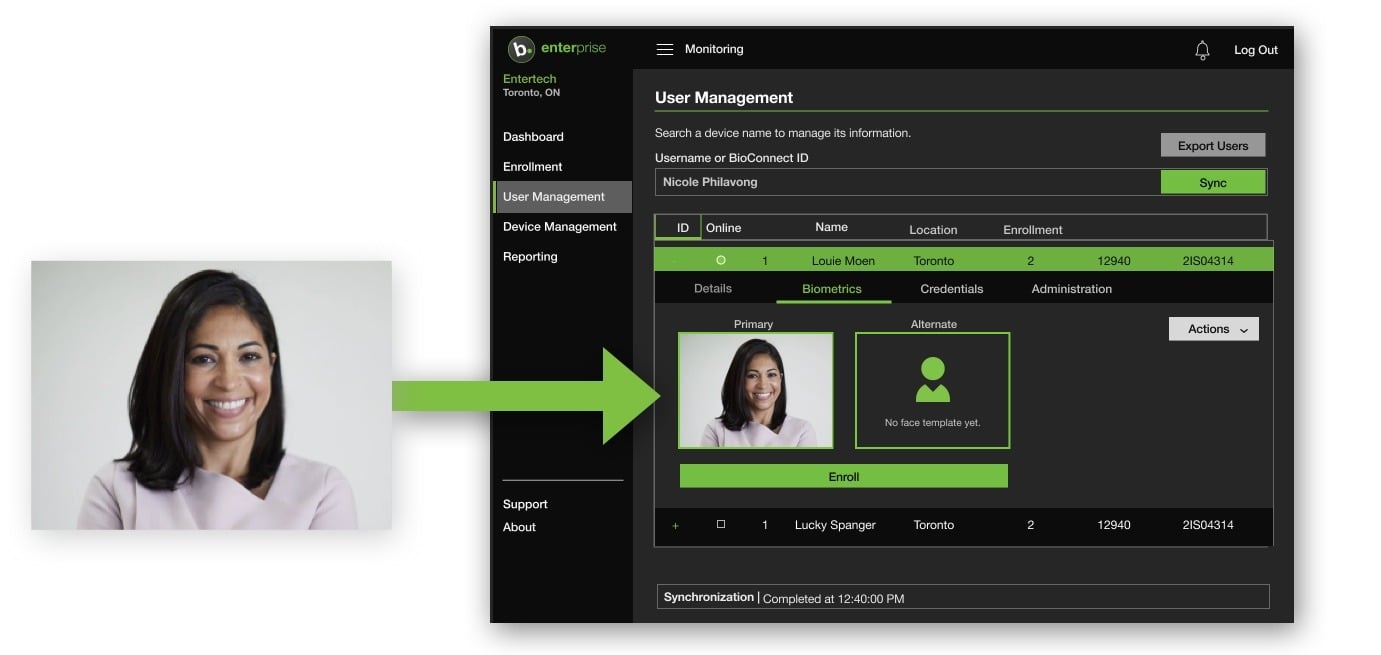
A no-enrollment approach lets you get a large population ready for facial authentication without scheduling enrollment sessions, creating duplicate user records, or asking employees to complete another administrative step. Since the process builds on the identity information you already manage, your existing access control system remains the source of truth.
Want to see how No Enrollment works? Book a demo.
Managing Facial Authentication Across Your Enterprise
Adding facial authentication to new locations shouldn’t ramp up administrative complexity. An enterprise-ready solution will let you manage biometric identities centrally across every site, while giving you the flexibility to use different authentication methods based on the security requirements of each space.
Let’s look at what this looks like in practice through the lens of a data center access control environment with four facilities across North America.
- A technician who works across multiple sites can enroll for facial authentication once and gain near-instant access to any of the four facilities.
- If the data center opens a fifth facility in 18 months, there’s no need to enroll the tech again. His existing biometric identity extends to the new location, assuming he has appropriate access permissions.
- The same principle applies as users, locations, and security requirements change. Centralized identity management lets you expand facial authentication where you need it without creating separate biometric systems, or separate enrollment processes, at every site.
Add Identity Assurance Without Starting Over
Your existing enterprise access control system doesn’t need replacing. Facial authentication makes it stronger by adding a layer of trusted identity assurance in the places you most need it. And with the right solution, it’s practical to deploy and manage at scale. You keep the infrastructure and credentials that already work, while gaining greater confidence that when a person requests access to a restricted area, they are actually authorized to enter.
Ready to add stronger identity assurance to your enterprise? Use the Solution Builder to find the right biometric access control solution for your environment.
FAQs
Q: Can I add facial authentication to my existing access control system?
A: Yes. Facial authentication can work alongside an existing physical access control system (PACS) rather than replacing it. Your PACS remains the system of record for permissions and access levels, while a biometric identity management layer verifies the identity of the person requesting access.
Q: Do I need to enroll every employee manually for facial authentication?
A: Not with BioConnect. The No Enrollment feature uses approved profile images already stored in your access control system to create the biometric templates required for facial authentication.
Q: Can facial authentication scale across multiple locations?
A: Yes. An enterprise-ready solution lets you centrally manage biometric identities across multiple sites. Once users are enrolled, they can use their existing biometric identity at other locations where they have appropriate access permissions. There’s no need to re-enroll at every site.