Blog
Biometric Readers for Access Control: A Buyer’s Guide
A practical framework for evaluating biometric readers by access point: throughput, environment, PACS integration, and compliance.
Set face, card, and PIN policies by zone with one multi-modal biometric reader, so you don't need extra hardware at every colocation access point.
What you’ll learn: How to match biometric verification to every zone, from the perimeter to the rack, working with the access control system you already run.
Who should read this: Facilities and physical security directors responsible for colocation sites.
The best biometric access control hardware for a colocation facility is a multi-modal reader: one device that supports biometric (either face or fingerprint), card, and PIN authentication, so you can match the level of verification to the risk at each access point. Instead of buying different hardware for different access points, teams can standardize on multi-modal readers and set policy by zone, all managed within a larger biometric access control architecture.
Each zone creates different demands. The perimeter needs throughput for staff and visitors, while data halls and customer cages call for stronger verification before anyone reaches shared infrastructure or tenant equipment. A multi-modal reader like the Arc Vision handles those differences through configuration, not separate hardware. For example, you can require face only at the perimeter, face plus card or pin at the data hall, and face plus card at customer cages, all on the same reader.
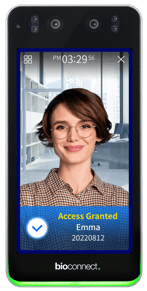
The Arc Vision biometric reader supports face, pin and card authentication.
Quick biometric device selection guide
|
Access point |
Best-fit hardware approach |
Why it fits colocation |
|
Main perimeter entry |
Facial authentication |
Keeps staff and visitors moving while still verifying identity |
|
Data hall entry |
Face + card or pin |
Adds stronger controls before access to shared critical infrastructure |
|
Customer cages |
Face + card or pin |
Tenant access can be updated once and enforced everywhere, with a single audit trail per tenant |
|
Server cabinets / racks |
Cabinet or rack-level biometric hardware |
Extends identity verification to the asset level when contracts or compliance require it |
The most effective approach is centralized management: users enroll once and can authenticate at any site, with access policies, consent, and audit reporting handled from one place. Without it, each site runs its own enrollment and permissions, which means repeat enrollment, inconsistent rules, and audit logs scattered across locations.
BioConnect Enterprise uses a hub-and-spoke architecture: a master server manages policies, enrollment, and consent centrally, while satellite servers extend coverage to new sites. Each server supports up to 1,000 devices, so you can add facilities without rebuilding your setup. A technician enrolls once and can authenticate at any site, whether you run three facilities or thirty. When a tenant asks for an access report, you pull it from one system, regardless of how many locations you've added.
Start where stronger identity verification delivers the clearest value. That's often not your perimeter entry, but the move into high-security interior zones, customer cages, or server cabinets.
A practical rollout often looks like this:
The most important hardware features are the ones that hold up under real operational pressure: identity assurance, multi-factor flexibility, integration readiness, and support for auditability.
For colocation sites, prioritize hardware that can support:
BioConnect offers built-in privacy controls and consent management designed to support regulations such as BIPA, GDPR, and CCPA as well as centralized identity management.
BioConnect adds biometric identity verification on top of the access control system you already run, so you can secure every site from the perimeter to the rack without replacing existing infrastructure. It's trusted by 8 of the top 10 colocation providers.
Map every access point to the level of identity verification it needs, then shortlist readers that can enforce those levels from one centrally managed platform. Starting from your access points rather than a spec sheet gives you a decision you can defend to leadership, auditors, and tenants.
Start with these questions before you talk to vendors:
Your answers to the above become your requirements list. To turn them into a recommendation, use BioConnect's Solution Builder to match your environment, authentication needs, and access control system to the right reader and configuration.
A practical framework for evaluating biometric readers by access point: throughput, environment, PACS integration, and compliance.
Suprema’s expertise in biometric access control technology is enhanced by the power of Artificial Intelligence (AI). Suprema has consistently...
BioConnect’s biometric access management platform interfaces with LenelS2’s OnGuard access control security system.